<?xml version="1.0" encoding="utf-8"?>
<feed xmlns="http://www.w3.org/2005/Atom">
  <title>XX&#39;s Blog</title>
  
  
  <link href="https://nocticat.com/atom.xml" rel="self"/>
  
  <link href="https://nocticat.com/"/>
  <updated>2024-09-08T13:45:06.018Z</updated>
  <id>https://nocticat.com/</id>
  
  <author>
    <name>XX</name>
    
  </author>
  
  <generator uri="https://hexo.io/">Hexo</generator>
  
  <entry>
    <title>Long Island Iced Tea</title>
    <link href="https://nocticat.com/Life/Long-Island-Iced-Tea/"/>
    <id>https://nocticat.com/Life/Long-Island-Iced-Tea/</id>
    <published>2024-09-08T13:15:02.000Z</published>
    <updated>2024-09-08T13:45:06.018Z</updated>
    
    <content type="html"><![CDATA[<center><font size ='5'><i>'Evening Rhythms: Games, GYMs, and Drinks'</i></font></center><span id="more"></span><hr><h2 id="Games"><a href="#Games" class="headerlink" title="Games"></a>Games</h2><p>开坑了只狼(Sekiro：Shadows Die Twice),开局很抓人眼球,不过地图设计强烈谴责!!!不过某些转角我真的是宫崎英高我#@%!!!<br>玩了10个小时,打击感很爽,慢慢开始难了.</p><h2 id="GYM"><a href="#GYM" class="headerlink" title="GYM"></a>GYM</h2><p>游泳🏊1200m,用时50min.</p><h2 id="Drinks"><a href="#Drinks" class="headerlink" title="Drinks"></a>Drinks</h2><p>长岛冰茶(Long Island Iced Tea)是一款以伏特加、白兰地、龙舌兰、金朗姆、柠檬汁、可乐为基础的鸡尾酒,是一款非常经典的鸡尾酒.这款鸡尾酒的名字来源于美国纽约的长岛,但是这款鸡尾酒并不是来自长岛,而是来自美国田纳西州的一家酒吧.</p><h3 id="制作"><a href="#制作" class="headerlink" title="制作"></a>制作</h3><p>制作起来略为困难,听他的名字不了解的人一般人根本猜不到它居然有这么多的酒:<br>15ml 金酒(Gin), 15ml 朗姆酒(Rum), 15ml 伏特加(Vodka), 15ml 龙舌兰(Tequila), 15ml 柠檬汁,15ml 君度.<br>Shaking…<br>滤出酒液后补满可乐,并加上一勺白砂糖.<br><a href="https://cdn.jsdelivr.net/gh/yingxiaowoxx/Blog-img/img/8B2748CE-1309-4951-A4B5-F06A9598FCCB_1_105_c.jpeg">!Long Island Iced Tea</a></p><h3 id="味道"><a href="#味道" class="headerlink" title="味道"></a>味道</h3><p>刚入口是柠檬的酸味,之后可乐的甜味慢慢在嘴中晕开,最后回味里是绵延的酒味,整体的味道的层次感非常丰富,是一款非常经典的鸡尾酒.</p>]]></content>
    
    
    <summary type="html">&lt;center&gt;
&lt;font size =&#39;5&#39;&gt;&lt;i&gt;&#39;Evening Rhythms: Games, GYMs, and Drinks&#39;&lt;/i&gt;&lt;/font&gt;
&lt;/center&gt;</summary>


    <category term="Life" scheme="https://nocticat.com/categories/Life/"/>
    
    
    <category term="Drinks" scheme="https://nocticat.com/tags/Drinks/"/>
    
  </entry>
  
  <entry>
    <title>Keg of Cola</title>
    <link href="https://nocticat.com/Life/Keg-of-Cola/"/>
    <id>https://nocticat.com/Life/Keg-of-Cola/</id>
    <published>2024-07-31T14:36:34.000Z</published>
    <updated>2024-09-08T13:39:43.253Z</updated>
    
    <content type="html"><![CDATA[<center><font size ='5'><i>'Evening Rhythms: Games, GYMs, and Drinks'</i></font></center><span id="more"></span><hr><h2 id="GYM"><a href="#GYM" class="headerlink" title="GYM"></a>GYM</h2><p>游泳🏊800m,用时30min.</p><h3 id="可乐桶"><a href="#可乐桶" class="headerlink" title="可乐桶"></a>可乐桶</h3><p>可乐桶(keg of cola),制作简单,仅仅需要whiskey+可乐.由于可乐桶是Jack Daniel’s调制的,所以一般建议使用Jack Daniel’s Whiskey.<br>以及<br>一定要用可口可乐!一定要用可口可乐!一定要用可口可乐!<br>因为百事可乐<u>🐶都不喝😠(雾)</u>糖分太多了.</p><h3 id="制作"><a href="#制作" class="headerlink" title="制作"></a>制作</h3><p>标准配比为60ml的whiskey + 250ml的可口可乐,<u>逝量的</u>冰块🧊,柠檬片🍋.<br>Shaking…<br><img src="https://cdn.jsdelivr.net/gh/yingxiaowoxx/Blog-img/img/c4b48d122355f9b3772f6d1fed943255.jpeg" alt="keg of cola"></p><h3 id="口感"><a href="#口感" class="headerlink" title="口感"></a>口感</h3><p>入口是马上感到的是可乐的甜,片刻后whiskey的香味慢慢散发开,最后以酒精味收尾.不过不知道为什么我的嘴巴里更多的是可乐的”回甘”.</p><p>推荐指数:🌟🌟🌟🌟,整体是好喝的,但是整体还是太甜了,可能是我没有加柠檬导致味觉层次不那么丰富.</p>]]></content>
    
    
    <summary type="html">&lt;center&gt;
&lt;font size =&#39;5&#39;&gt;&lt;i&gt;&#39;Evening Rhythms: Games, GYMs, and Drinks&#39;&lt;/i&gt;&lt;/font&gt;
&lt;/center&gt;</summary>


    <category term="Life" scheme="https://nocticat.com/categories/Life/"/>
    
    
    <category term="Drinks" scheme="https://nocticat.com/tags/Drinks/"/>
    
  </entry>
  
  <entry>
    <title>Evening Rhythms: Games, GYMs, and Drinks</title>
    <link href="https://nocticat.com/Life/Evening-Rhythms-Games-GYMs-and-Drinks/"/>
    <id>https://nocticat.com/Life/Evening-Rhythms-Games-GYMs-and-Drinks/</id>
    <published>2024-07-30T15:59:55.000Z</published>
    <updated>2024-07-31T14:34:57.381Z</updated>
    
    <content type="html"><![CDATA[<center><font size ='5'><i>'Evening Rhythms: Games, GYMs, and Drinks'</i></font></center><span id="more"></span><hr><h2 id="写在开始之前"><a href="#写在开始之前" class="headerlink" title="写在开始之前"></a>写在开始之前</h2><p>本篇用于记录我所有的调酒记录,如果有一天不搞AI了,就去摆摊卖酒😆.<br><img src="https://cdn.jsdelivr.net/gh/yingxiaowoxx/Blog-img/img/2fa39e72ababc9abe804ea2153c7dc3a.jpeg" alt="wow"></p><h2 id="器具选择"><a href="#器具选择" class="headerlink" title="器具选择"></a>器具选择</h2><h3 id="Shaker"><a href="#Shaker" class="headerlink" title="Shaker"></a>Shaker</h3><p>器具流派的选择主要是摇酒壶(Shaker)的选择,一般的shaker可以分为三种:</p><ul><li><p>波士顿摇酒壶(Boston Shaker):两段式的器具,由大杯(Large Tin)和小杯(Small Tin&#x2F;Mixing Glass)组成.<br>对于Small Tin依据材质不同可分为不锈钢和玻璃制,玻璃Tin更能够体现调酒过程的美感,同时也更容易坏💔.使用的时候直接将冰块🧊,酒🍷<br>以及其他的杂项🍋放入大杯后.将小杯的一侧杯壁与大杯的杯壁呈一条直线,另一侧杯壁斜置,捶入大杯中.<br>Shaking…<br>轻敲大杯两侧即可将酒杯取出,之后使用过滤器(Strainer)将酒从碎冰和浮末中滤出.<br>值得一提的是,Boston Shaker通常使用霍桑过滤器(Hawthorne Strainer),它带有弹簧边缘.<br>通常来讲Boston Shaker的容量更大,同时也上手难度更高.</p></li><li><p>三段式摇酒壶(Cobbler Shaker):也叫日式摇酒壶,三段式的器具,由底部杯(Base),过滤器(Strainer)和顶盖(Cap)组成.<br>由于自带Strainer,所以Cobbler Shaker相较于Boston Shaker来说,更方便上手.同时,由于自带Cap,它爆Tin的概率也比Boston Shaker要小.<br>很适合新手入门.</p></li><li><p>法式摇酒壶(French Shaker):比较少,有Base和Cap,比Boston Shaker的密封性要好很多,但是没有内置的Strainer.</p></li></ul><h3 id="Jigger"><a href="#Jigger" class="headerlink" title="Jigger"></a>Jigger</h3><p>量杯,两个金字塔形结构,塔尖对在一起,一大一小.<br>哈哈😄,居然会有商家卖不带刻度的量杯.<br>一定要买带刻度的!<br>一定要买带刻度的!<br>一定要买带刻度的!</p>]]></content>
    
    
    <summary type="html">&lt;center&gt;
&lt;font size =&#39;5&#39;&gt;&lt;i&gt;&#39;Evening Rhythms: Games, GYMs, and Drinks&#39;&lt;/i&gt;&lt;/font&gt;
&lt;/center&gt;</summary>


    <category term="Life" scheme="https://nocticat.com/categories/Life/"/>
    
    
    <category term="Drinks" scheme="https://nocticat.com/tags/Drinks/"/>
    
  </entry>
  
  <entry>
    <title>Cheat_Sheet</title>
    <link href="https://nocticat.com/Computer-Science/Cheat-sheet/"/>
    <id>https://nocticat.com/Computer-Science/Cheat-sheet/</id>
    <published>2024-07-06T15:11:16.000Z</published>
    <updated>2024-07-06T16:47:32.677Z</updated>
    
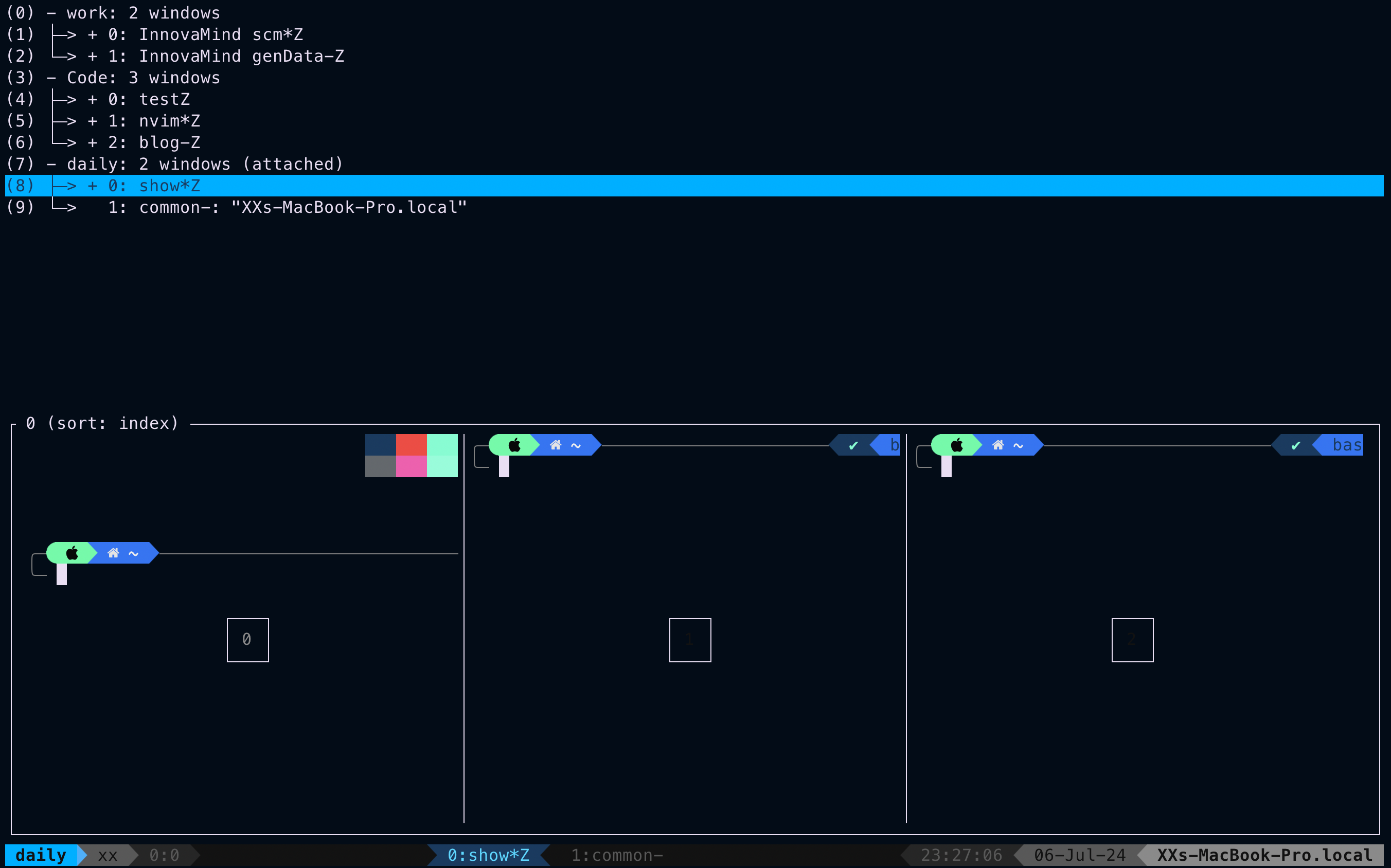
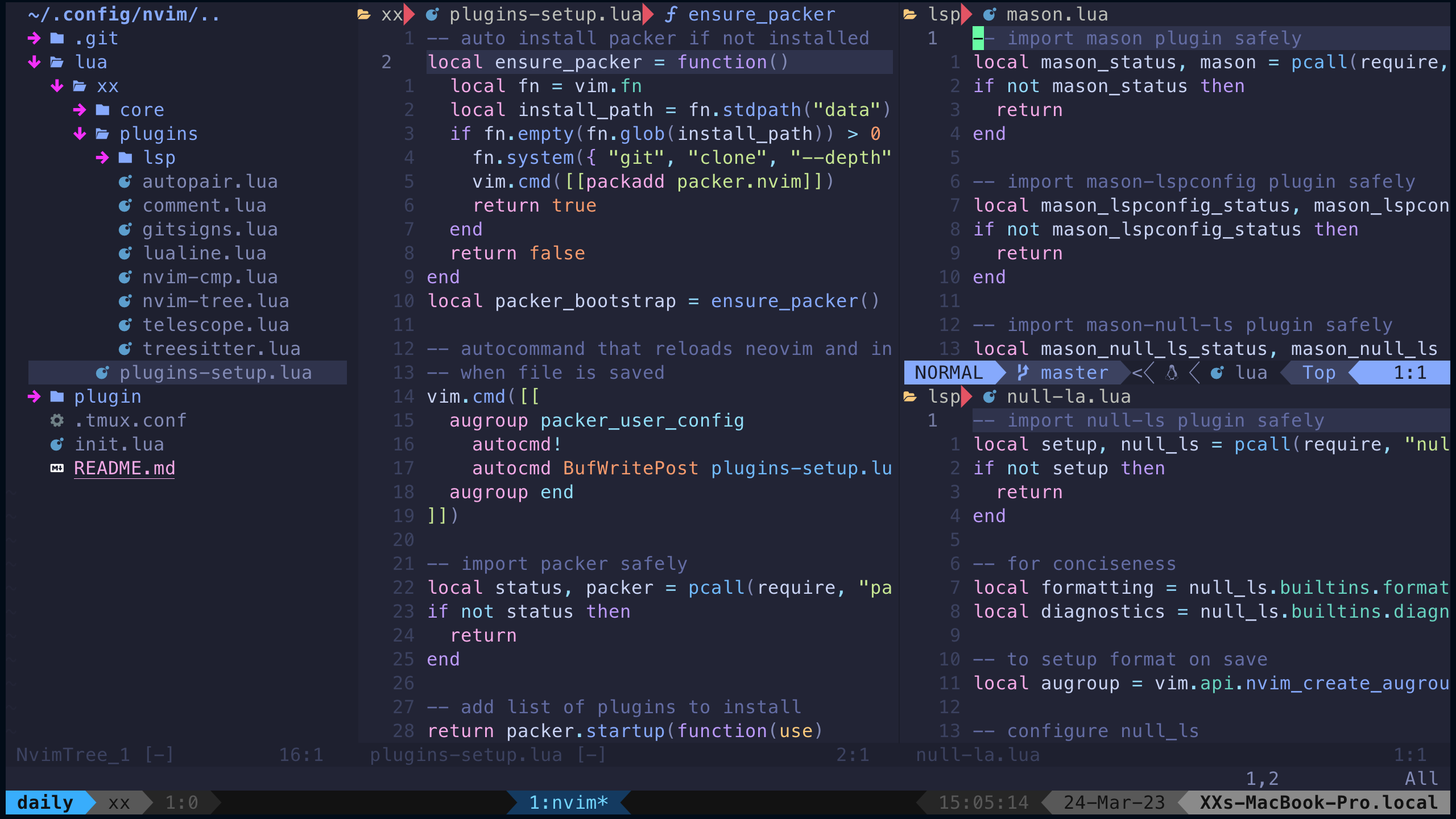
    <content type="html"><![CDATA[<center><font size ='5'><i>This blog records my workflow cheat sheet.</i></font></center><span id="more"></span><hr><h2 id="Tmux"><a href="#Tmux" class="headerlink" title="Tmux"></a>Tmux</h2><p>Tmux is a terminal multiplexer that allows you to access multiple terminal sessions within a single terminal window or remote terminal session.</p><p>In tmux, there is a concept of a session, window, and pane.</p><ul><li>Session: A tmux session is a container for one or more windows.</li><li>Window: A tmux window occupies the entire screen and may be split into rectangular panes.</li><li>Pane: A tmux pane is a rectangular part of a window that runs a specific command.</li></ul><p><img src="https://cdn.jsdelivr.net/gh/yingxiaowoxx/Blog-img/img/20240706234458.png" alt="Session, Window and Pane"></p><p>Here are some basic commands for tmux:</p><h3 id="Cli-commands"><a href="#Cli-commands" class="headerlink" title="Cli commands"></a>Cli commands</h3><table><thead><tr><th align="left">Command</th><th align="left">Description</th></tr></thead><tbody><tr><td align="left"><code>tmux new -s session_name</code></td><td align="left">Create a new session with the name <code>session_name</code></td></tr><tr><td align="left"><code>tmux a -t session_name</code></td><td align="left">Attach to the session <code>session_name</code></td></tr><tr><td align="left"><code>tmux ls</code></td><td align="left">List all sessions</td></tr><tr><td align="left"><code>tmux kill-session -t session_name</code></td><td align="left">Kill the session <code>session_name</code></td></tr></tbody></table><h3 id="Session-management"><a href="#Session-management" class="headerlink" title="Session management"></a>Session management</h3><h1 id="Session-management-1"><a href="#Session-management-1" class="headerlink" title="Session management:"></a>Session management:</h1><table><thead><tr><th align="left">Hotkeys</th><th align="left">Description</th></tr></thead><tbody><tr><td align="left">Ctrl + A</td><td align="left">Prefix Default: Ctrl + B</td></tr><tr><td align="left">[prefix] s</td><td align="left">list sessions</td></tr><tr><td align="left">[prefix] $</td><td align="left">rename the current session</td></tr><tr><td align="left">[prefix] (</td><td align="left">switch to the previous session</td></tr><tr><td align="left">[prefix] )</td><td align="left">switch to the next session</td></tr><tr><td align="left">[prefix] d</td><td align="left">detach the current session</td></tr></tbody></table><h1 id="Window-management"><a href="#Window-management" class="headerlink" title="Window management:"></a>Window management:</h1><table><thead><tr><th align="left">Hotkeys</th><th align="left">Description</th></tr></thead><tbody><tr><td align="left">[prefix] c</td><td align="left">create a new window</td></tr><tr><td align="left">[prefix] &amp;</td><td align="left">kill the current window</td></tr><tr><td align="left">[prefix] n&#x2F;p</td><td align="left">move to the next &#x2F; previous window</td></tr><tr><td align="left">[prefix] w</td><td align="left">list windows</td></tr><tr><td align="left">[prefix] f</td><td align="left">find window</td></tr><tr><td align="left">[prefix] ,</td><td align="left">rename the current window</td></tr></tbody></table><h1 id="Pane-management"><a href="#Pane-management" class="headerlink" title="Pane management:"></a>Pane management:</h1><table><thead><tr><th align="left">Hotkeys</th><th align="left">Description</th></tr></thead><tbody><tr><td align="left">[prefix] |</td><td align="left">split the current pane vertically Default: -v</td></tr><tr><td align="left">[prefix] -</td><td align="left">split the current pane horizontally Default: -h</td></tr><tr><td align="left">[prefix] x</td><td align="left">kill the current pane</td></tr><tr><td align="left">[prefix] z</td><td align="left">toggle pane zoom</td></tr><tr><td align="left">[prefix] {</td><td align="left">move the current pane to the left</td></tr></tbody></table><h1 id="Pane-movement"><a href="#Pane-movement" class="headerlink" title="Pane movement:"></a>Pane movement:</h1><table><thead><tr><th align="left">Hotkeys</th><th align="left">Description</th></tr></thead><tbody><tr><td align="left">[prefix] Space</td><td align="left">toggle between layouts</td></tr><tr><td align="left">[prefix] h&#x2F;j&#x2F;k&#x2F;l</td><td align="left">move to the left&#x2F;down&#x2F;up&#x2F;right pane</td></tr></tbody></table><h3 id="Copy-mode-Vi-mode"><a href="#Copy-mode-Vi-mode" class="headerlink" title="Copy mode (Vi mode)"></a>Copy mode (Vi mode)</h3><table><thead><tr><th align="left">Hotkeys</th><th align="left">Description</th></tr></thead><tbody><tr><td align="left">[prefix] [</td><td align="left">enter copy mode</td></tr><tr><td align="left">[prefix] ]</td><td align="left">paste the copied text</td></tr><tr><td align="left">[prefix] v</td><td align="left">start selection Default: -[</td></tr><tr><td align="left">[prefix] y</td><td align="left">copy the selected text Default: -]</td></tr><tr><td align="left">[prefix] &#x2F;</td><td align="left">search forward</td></tr><tr><td align="left">[prefix] ?</td><td align="left">search backward</td></tr></tbody></table><hr><h2 id="Neovim"><a href="#Neovim" class="headerlink" title="Neovim"></a>Neovim</h2><p>NeoVim is a highly customizable text editor that is based on Vim. It is designed to be more extensible and easier to maintain than Vim.</p><p>In Neovim, there is a concept of normal mode, insert mode, and visual mode.</p><ul><li>Normal mode: The default mode for navigating and editing text.</li><li>Insert mode: The mode for inserting text.</li><li>Visual mode: The mode for selecting text.</li></ul><p><img src="https://raw.githubusercontent.com/yingxiaowoxx/Blog-img/master/img/20230324150528.png" alt="Neovim"></p>]]></content>
    
    
    <summary type="html">&lt;center&gt;
&lt;font size =&#39;5&#39;&gt;&lt;i&gt;This blog records my workflow cheat sheet.&lt;/i&gt;&lt;/font&gt;
&lt;/center&gt;</summary>


    <category term="Computer Science" scheme="https://nocticat.com/categories/Computer-Science/"/>
    
    
    <category term="Computer Scinece" scheme="https://nocticat.com/tags/Computer-Scinece/"/>
    
    <category term="Programming" scheme="https://nocticat.com/tags/Programming/"/>
    
  </entry>
  
  <entry>
    <title>My_workflow</title>
    <link href="https://nocticat.com/Linux/My-workflow/"/>
    <id>https://nocticat.com/Linux/My-workflow/</id>
    <published>2024-07-06T14:30:05.000Z</published>
    <updated>2024-07-06T16:17:28.541Z</updated>
    
    <content type="html"><![CDATA[<center><font size ='5'><i>My personal workflow with Nvim + Tmux</i></font></center><span id="more"></span><hr><p><strong><em>Experience is everything!</em></strong><br>These settings can make you focus on your workflow and improve coding efficiency.</p><p>You can also find this page in my <a href="https://nocticat.com/Tools/My-workflow/">blog</a>.<br><img src="https://raw.githubusercontent.com/yingxiaowoxx/Blog-img/master/img/93d1e7654df592a51374330b508c1106.png" alt="My work flow"></p><h2 id="iTerm2-Oh-My-Zsh"><a href="#iTerm2-Oh-My-Zsh" class="headerlink" title="iTerm2 + Oh My Zsh"></a>iTerm2 + Oh My Zsh</h2><p>It is a pretty nice combination to make your terminal so much better!</p><h3 id="Requirement"><a href="#Requirement" class="headerlink" title="Requirement"></a>Requirement</h3><blockquote><p><strong><em>HOMEBREW</em></strong></p></blockquote><p>First of all, you need <a href="https://brew.sh/">homebrew</a> to manage your packages on mac.</p><figure class="highlight bash"><table><tr><td class="gutter"><pre><span class="line">1</span><br></pre></td><td class="code"><pre><code class="hljs bash">/bin/bash -c <span class="hljs-string">&quot;<span class="hljs-subst">$(curl -fsSL https://raw.githubusercontent.com/Homebrew/install/HEAD/install.sh)</span>&quot;</span><br></code></pre></td></tr></table></figure><p>Then add homebrew to your system path:</p><figure class="highlight bash"><table><tr><td class="gutter"><pre><span class="line">1</span><br><span class="line">2</span><br></pre></td><td class="code"><pre><code class="hljs bash"><span class="hljs-built_in">echo</span> <span class="hljs-string">&#x27;eval &quot;$(/opt/homebrew/bin/brew shellenv)&quot;&#x27;</span> &gt;&gt; /Users/[username]/.zprofile<br><span class="hljs-built_in">eval</span> <span class="hljs-string">&quot;<span class="hljs-subst">$(/opt/homebrew/bin/brew shellenv)</span>&quot;</span><br></code></pre></td></tr></table></figure><blockquote><p><strong><em>Packages</em></strong></p></blockquote><ul><li><a href="https://iterm2.com/">iTerm2</a></li><li><a href="https://ohmyz.sh/">Oh My Zsh</a></li><li><a href="https://git-scm.com/">Git</a></li></ul><figure class="highlight bash"><table><tr><td class="gutter"><pre><span class="line">1</span><br></pre></td><td class="code"><pre><code class="hljs bash">brew install --cask iterm2<br></code></pre></td></tr></table></figure><figure class="highlight mipsasm"><table><tr><td class="gutter"><pre><span class="line">1</span><br></pre></td><td class="code"><pre><code class="hljs mipsasm"><span class="hljs-keyword">brew </span><span class="hljs-keyword">install </span>git<br></code></pre></td></tr></table></figure><figure class="highlight bash"><table><tr><td class="gutter"><pre><span class="line">1</span><br></pre></td><td class="code"><pre><code class="hljs bash">sh -c <span class="hljs-string">&quot;<span class="hljs-subst">$(curl -fsSL https://raw.githubusercontent.com/ohmyzsh/ohmyzsh/master/tools/install.sh)</span>&quot;</span><br></code></pre></td></tr></table></figure><p>You can find your favourite theme in the official <a href="https://github.com/ohmyzsh/ohmyzsh/wiki/Themes">document</a>.<br>My “<a href="https://github.com/romkatv/powerlevel10k">PowerLevel10K</a>“ theme look like this:<br><img src="https://raw.githubusercontent.com/yingxiaowoxx/Blog-img/master/img/20230324153531.png" alt="Oh my zsh"></p><h2 id="Neovim"><a href="#Neovim" class="headerlink" title="Neovim"></a>Neovim</h2><h3 id="Requirement-1"><a href="#Requirement-1" class="headerlink" title="Requirement"></a>Requirement</h3><blockquote><p><strong><em>Packages</em></strong></p></blockquote><ul><li><a href="https://neovim.io/">Neovim</a></li><li><a href="https://www.nerdfonts.com/">Nerd Font</a></li><li><a href="https://github.com/BurntSushi/ripgrep">Ripgrep</a></li><li>XCode Command Line Tools</li></ul><p>You also need to install iTerm2, Neovim, Ripgrep and Node with homebrew.</p><figure class="highlight bash"><table><tr><td class="gutter"><pre><span class="line">1</span><br></pre></td><td class="code"><pre><code class="hljs bash">brew install --cask iTerm2<br></code></pre></td></tr></table></figure><figure class="highlight bash"><table><tr><td class="gutter"><pre><span class="line">1</span><br></pre></td><td class="code"><pre><code class="hljs bash">brew install neovim<br></code></pre></td></tr></table></figure><figure class="highlight bash"><table><tr><td class="gutter"><pre><span class="line">1</span><br></pre></td><td class="code"><pre><code class="hljs bash">brew install ripgrep<br></code></pre></td></tr></table></figure><blockquote><p><strong><em>XCode Command Line Tools</em></strong></p></blockquote><figure class="highlight bash"><table><tr><td class="gutter"><pre><span class="line">1</span><br></pre></td><td class="code"><pre><code class="hljs bash">xcode-select --install<br></code></pre></td></tr></table></figure><h3 id="Actions"><a href="#Actions" class="headerlink" title="Actions"></a>Actions</h3><p>Create a directory named “nvim”:</p><figure class="highlight bash"><table><tr><td class="gutter"><pre><span class="line">1</span><br></pre></td><td class="code"><pre><code class="hljs bash"><span class="hljs-built_in">mkdir</span> ~/.config/nvim<br></code></pre></td></tr></table></figure><p>And then just clone my respository.<br>The folder structure looks like this:</p><figure class="highlight stylus"><table><tr><td class="gutter"><pre><span class="line">1</span><br><span class="line">2</span><br><span class="line">3</span><br><span class="line">4</span><br><span class="line">5</span><br><span class="line">6</span><br><span class="line">7</span><br><span class="line">8</span><br><span class="line">9</span><br><span class="line">10</span><br><span class="line">11</span><br><span class="line">12</span><br><span class="line">13</span><br><span class="line">14</span><br><span class="line">15</span><br><span class="line">16</span><br><span class="line">17</span><br><span class="line">18</span><br><span class="line">19</span><br><span class="line">20</span><br><span class="line">21</span><br><span class="line">22</span><br><span class="line">23</span><br><span class="line">24</span><br><span class="line">25</span><br></pre></td><td class="code"><pre><code class="hljs stylus">.<br>├── init<span class="hljs-selector-class">.lua</span><br>├── lua<br>│   └── your_username<br>│       ├── core<br>│       │   ├── colorscheme<span class="hljs-selector-class">.lua</span><br>│       │   ├── keymaps<span class="hljs-selector-class">.lua</span><br>│       │   └── options<span class="hljs-selector-class">.lua</span><br>│       ├── plugins<br>│       │   ├── autopair<span class="hljs-selector-class">.lua</span><br>│       │   ├── comment<span class="hljs-selector-class">.lua</span><br>│       │   ├── gitsigns<span class="hljs-selector-class">.lua</span><br>│       │   ├── lsp<br>│       │   │   ├── lspconfig<span class="hljs-selector-class">.lua</span><br>│       │   │   ├── lspsaga<span class="hljs-selector-class">.lua</span><br>│       │   │   ├── mason<span class="hljs-selector-class">.lua</span><br>│       │   │   └── null-la<span class="hljs-selector-class">.lua</span><br>│       │   ├── lualine<span class="hljs-selector-class">.lua</span><br>│       │   ├── nvim-cmp<span class="hljs-selector-class">.lua</span><br>│       │   ├── nvim-tree<span class="hljs-selector-class">.lua</span><br>│       │   ├── telescope<span class="hljs-selector-class">.lua</span><br>│       │   └── treesitter<span class="hljs-selector-class">.lua</span><br>│       └── plugins-setup<span class="hljs-selector-class">.lua</span><br>└── plugin<br>    └── packer_compiled.lua<br></code></pre></td></tr></table></figure><p>It will be look like this:<br><img src="https://raw.githubusercontent.com/yingxiaowoxx/Blog-img/master/img/20230324150528.png" alt="Neovim"></p><h2 id="Tmux"><a href="#Tmux" class="headerlink" title="Tmux"></a>Tmux</h2><h3 id="Requirement-2"><a href="#Requirement-2" class="headerlink" title="Requirement"></a>Requirement</h3><p>Please ensure you have installed <a href="https://github.com/tmux/tmux/wiki">tmux</a> first.</p><figure class="highlight bash"><table><tr><td class="gutter"><pre><span class="line">1</span><br></pre></td><td class="code"><pre><code class="hljs bash">brew install tmux<br></code></pre></td></tr></table></figure><h3 id="Actions-1"><a href="#Actions-1" class="headerlink" title="Actions"></a>Actions</h3><p>You just need create a “.tmux.conf” file in your home directory.</p><figure class="highlight bash"><table><tr><td class="gutter"><pre><span class="line">1</span><br></pre></td><td class="code"><pre><code class="hljs bash">nvim ~/.tmux.conf<br></code></pre></td></tr></table></figure><p>And then copy <a href="https://github.com/yingxiaowoxx/Neovim/blob/master/.tmux.conf">my config</a> into your <strong>“.tmux.conf”</strong> file.<br>It will be look like this:<br><img src="https://raw.githubusercontent.com/yingxiaowoxx/Blog-img/master/img/20230324144855.png" alt="Tmux"></p><h1 id="Congratulations"><a href="#Congratulations" class="headerlink" title="Congratulations!"></a>Congratulations!</h1><p>Reference: @<a href="https://github.com/josean-dev/dev-environment-files">josean</a> @<a href="https://github.com/bryant-video/neovim-tutorial">bryant</a></p>]]></content>
    
    
    <summary type="html">&lt;center&gt;
&lt;font size =&#39;5&#39;&gt;&lt;i&gt;My personal workflow with Nvim + Tmux&lt;/i&gt;&lt;/font&gt;
&lt;/center&gt;</summary>


    <category term="Linux" scheme="https://nocticat.com/categories/Linux/"/>
    
    
    <category term="Tmux" scheme="https://nocticat.com/tags/Tmux/"/>
    
    <category term="Neovim" scheme="https://nocticat.com/tags/Neovim/"/>
    
  </entry>
  
  <entry>
    <title>Linux_Course</title>
    <link href="https://nocticat.com/Linux/Linux-Course/"/>
    <id>https://nocticat.com/Linux/Linux-Course/</id>
    <published>2023-02-01T11:16:59.000Z</published>
    <updated>2024-07-06T16:17:28.264Z</updated>
    
    <content type="html"><![CDATA[<center><font size ='5'><i>This blog records my Linux learning process.</i></font></center><span id="more"></span><hr><h3 id="Commands"><a href="#Commands" class="headerlink" title="Commands"></a>Commands</h3><h4 id="ls"><a href="#ls" class="headerlink" title="ls"></a>ls</h4><figure class="highlight bash"><table><tr><td class="gutter"><pre><span class="line">1</span><br></pre></td><td class="code"><pre><code class="hljs bash"><span class="hljs-built_in">ls</span> [-a -l -h] [path]<br></code></pre></td></tr></table></figure><p>“-a” shows some hidden directories or files.</p><p>“-l” shows more information.</p><p>“-h” shows the filesize which should be used with “-h”.</p><h4 id="cd-pwd"><a href="#cd-pwd" class="headerlink" title="cd pwd"></a>cd pwd</h4><figure class="highlight bash"><table><tr><td class="gutter"><pre><span class="line">1</span><br><span class="line">2</span><br><span class="line">3</span><br></pre></td><td class="code"><pre><code class="hljs bash"><span class="hljs-built_in">cd</span> ./[path]  <span class="hljs-comment">#workdir</span><br><span class="hljs-built_in">cd</span> ..        <span class="hljs-comment">#predir</span><br><span class="hljs-built_in">cd</span> ~         <span class="hljs-comment">#homedir</span><br></code></pre></td></tr></table></figure><p>“cd” change directory<br>“pwd” print work directory</p><h4 id="mkdir"><a href="#mkdir" class="headerlink" title="mkdir"></a>mkdir</h4><figure class="highlight bash"><table><tr><td class="gutter"><pre><span class="line">1</span><br></pre></td><td class="code"><pre><code class="hljs bash"><span class="hljs-built_in">mkdir</span> [-p] path<br></code></pre></td></tr></table></figure><p>Make directory<br>“-p” can create directory-chain</p><h4 id="touch"><a href="#touch" class="headerlink" title="touch"></a>touch</h4><figure class="highlight bash"><table><tr><td class="gutter"><pre><span class="line">1</span><br><span class="line">2</span><br><span class="line">3</span><br></pre></td><td class="code"><pre><code class="hljs bash"><span class="hljs-built_in">touch</span> filename   <span class="hljs-comment">#create file</span><br><span class="hljs-built_in">cat</span> path         <span class="hljs-comment">#show file</span><br>more path        <span class="hljs-comment">#show file with pages</span><br></code></pre></td></tr></table></figure><h4 id="cp-mv-rm"><a href="#cp-mv-rm" class="headerlink" title="cp mv rm"></a>cp mv rm</h4><p>copy move remove</p><figure class="highlight bash"><table><tr><td class="gutter"><pre><span class="line">1</span><br><span class="line">2</span><br><span class="line">3</span><br></pre></td><td class="code"><pre><code class="hljs bash"><span class="hljs-built_in">cp</span> [-r] copied copy   <span class="hljs-comment">#&quot;-r&quot; copy dir</span><br><span class="hljs-built_in">mv</span> moved path/<br><span class="hljs-built_in">rm</span> [-r -f] para1 para2 ... paraN <span class="hljs-comment">#&quot;-r&quot; remove dir &quot;-f&quot; force</span><br></code></pre></td></tr></table></figure><p>“<em>“ refers to wildcard<br>e.g.:”test</em>“ can represent test1 test2 test3</p><h4 id="which-find"><a href="#which-find" class="headerlink" title="which find"></a>which find</h4><figure class="highlight bash"><table><tr><td class="gutter"><pre><span class="line">1</span><br><span class="line">2</span><br><span class="line">3</span><br></pre></td><td class="code"><pre><code class="hljs bash"><span class="hljs-built_in">which</span> <span class="hljs-built_in">command</span><br>find startpath -name <span class="hljs-string">&quot;filename&quot;</span><br>find startpath -size +|-n[kMG] <span class="hljs-comment">#&quot;-10k&quot; &lt;10kb &quot;+100M&quot; &gt;100Mb</span><br></code></pre></td></tr></table></figure><h4 id="grep-wc-Pipeline"><a href="#grep-wc-Pipeline" class="headerlink" title="grep wc Pipeline|"></a>grep wc Pipeline|</h4><p>global regular expression print, Word count</p><figure class="highlight bash"><table><tr><td class="gutter"><pre><span class="line">1</span><br><span class="line">2</span><br><span class="line">3</span><br><span class="line">4</span><br></pre></td><td class="code"><pre><code class="hljs bash">grep [-n] <span class="hljs-string">&quot;keyword&quot;</span> path  <span class="hljs-comment">#&quot;-n&quot; show line number</span><br><span class="hljs-built_in">wc</span> [-c -m -l -w]          <span class="hljs-comment">#&quot;-c&quot;bytesum &quot;-m&quot;charactersum</span><br>                          <span class="hljs-comment">#&quot;-l&quot;linesum &quot;-w&quot;wordsum</span><br><span class="hljs-built_in">cat</span> filename | grep <span class="hljs-string">&quot;keyword&quot;</span><br></code></pre></td></tr></table></figure><p>“left | right” left output is the input of right.</p><h4 id="echo-96-96-gt-gt-gt-tail"><a href="#echo-96-96-gt-gt-gt-tail" class="headerlink" title="echo &#96;&#96; &gt; &gt;&gt; tail"></a>echo &#96;&#96; &gt; &gt;&gt; tail</h4><figure class="highlight bash"><table><tr><td class="gutter"><pre><span class="line">1</span><br><span class="line">2</span><br><span class="line">3</span><br><span class="line">4</span><br><span class="line">5</span><br><span class="line">6</span><br></pre></td><td class="code"><pre><code class="hljs bash"><span class="hljs-built_in">echo</span> <span class="hljs-string">&quot;output word&quot;</span><br><span class="hljs-built_in">echo</span> `<span class="hljs-built_in">command</span>`          <span class="hljs-comment">#same as command &gt; filename      #cover the file with the output</span><br><span class="hljs-built_in">command</span> &gt;&gt; filename     <span class="hljs-comment">#add the output to the file</span><br><span class="hljs-built_in">echo</span> <span class="hljs-string">&#x27;hello world&#x27;</span> &gt;&gt; test.txt<br><span class="hljs-built_in">tail</span> [-f -num] path     <span class="hljs-comment">#show tail line of the file</span><br>                        <span class="hljs-comment">#&quot;-f&quot; can follow change immediately</span><br></code></pre></td></tr></table></figure><h3 id="root"><a href="#root" class="headerlink" title="root"></a>root</h3><h4 id="su"><a href="#su" class="headerlink" title="su"></a>su</h4><p>switch user</p><figure class="highlight bash"><table><tr><td class="gutter"><pre><span class="line">1</span><br><span class="line">2</span><br></pre></td><td class="code"><pre><code class="hljs bash">su [-] [username] <span class="hljs-comment">#&quot;-&quot; load environment var</span><br><span class="hljs-built_in">exit</span>              <span class="hljs-comment">#back to the pre user</span><br></code></pre></td></tr></table></figure><h4 id="sudo"><a href="#sudo" class="headerlink" title="sudo"></a>sudo</h4><p>switch user do<br>the user who verified can sudo</p><figure class="highlight bash"><table><tr><td class="gutter"><pre><span class="line">1</span><br><span class="line">2</span><br></pre></td><td class="code"><pre><code class="hljs bash">sudo <span class="hljs-built_in">command</span><br>visudo          <span class="hljs-comment">#verify user</span><br></code></pre></td></tr></table></figure><h4 id="usergroup"><a href="#usergroup" class="headerlink" title="usergroup"></a>usergroup</h4><figure class="highlight bash"><table><tr><td class="gutter"><pre><span class="line">1</span><br><span class="line">2</span><br><span class="line">3</span><br><span class="line">4</span><br><span class="line">5</span><br><span class="line">6</span><br><span class="line">7</span><br><span class="line">8</span><br></pre></td><td class="code"><pre><code class="hljs bash">groupadd groupname<br>groupdel groupname<br><br>useradd [-g -d] username <span class="hljs-comment">#&quot;-g&quot; add to existed group &quot;-d&quot; user home path</span><br>userdel [-r] username    <span class="hljs-comment">#&quot;-r&quot; delete user homedir</span><br><span class="hljs-built_in">id</span> [username]            <span class="hljs-comment">#check the usergroup</span><br>usermod -aG usergroup username <span class="hljs-comment">#modify usergroup</span><br>getent [passwd group]                  <span class="hljs-comment">#check all the usergroup</span><br></code></pre></td></tr></table></figure><h4 id="ls-l-description"><a href="#ls-l-description" class="headerlink" title="ls -l description"></a>ls -l description</h4><p><img src="https://cdn.jsdelivr.net/gh/yingxiaowoxx/Blog-img/img/20230204132302.png" alt="&quot;ls -l&quot; output"><br>e.g.</p><table><thead><tr><th align="center">1</th><th align="center">2</th><th align="center">3</th><th align="center">4</th><th align="center">5</th><th align="center">6</th><th align="center">7</th><th align="center">8</th><th align="center">9</th><th align="center">10</th></tr></thead><tbody><tr><td align="center">d</td><td align="center">rwx</td><td align="center">rwx</td><td align="center">r-x</td><td align="center">4</td><td align="center">xx</td><td align="center">xx</td><td align="center">4096</td><td align="center">Feb 2 19:07</td><td align="center">Desktop</td></tr></tbody></table><p><strong>Field 1</strong>- for File, d for Directory, l for Link</p><p><strong>Field 2,3,4</strong> Those are permissions that means read, write and execute, and comes in three different fields that belongs to the permission the:</p><ul><li>second: The owner has over the file</li><li>third: The group has over the file</li><li>fourth: Everybody else has over the file</li></ul><p><strong>Field 5</strong> This field specifies the number of links or directories inside this directory.</p><p><strong>Field 6</strong> The user that owns the file, or directory.</p><p><strong>Field 7</strong> The group that file belongs to, and any user in that group will have the permissions given in the third field over that file.</p><p><strong>Field 8</strong> The size in bytes, you may modify this by using the -h option together with -l this will have the output in k,M,G for a better understanding.</p>]]></content>
    
    
    <summary type="html">&lt;center&gt;
&lt;font size =&#39;5&#39;&gt;&lt;i&gt;This blog records my Linux learning process.&lt;/i&gt;&lt;/font&gt;
&lt;/center&gt;</summary>


    <category term="Linux" scheme="https://nocticat.com/categories/Linux/"/>
    
    
    <category term="Computer Scinece" scheme="https://nocticat.com/tags/Computer-Scinece/"/>
    
    <category term="Linux" scheme="https://nocticat.com/tags/Linux/"/>
    
  </entry>
  
  <entry>
    <title>CSapp-Chapter3</title>
    <link href="https://nocticat.com/Computer-Science/CSapp-Chapter-3/"/>
    <id>https://nocticat.com/Computer-Science/CSapp-Chapter-3/</id>
    <published>2022-11-30T05:16:09.000Z</published>
    <updated>2023-03-20T12:22:08.000Z</updated>
    
    <content type="html"><![CDATA[<center><font size ='5'><i>Computer System A Programmers Perspective</i></font></center><span id="more"></span><h3 id="Machine-Level-Code"><a href="#Machine-Level-Code" class="headerlink" title="Machine-Level Code"></a>Machine-Level Code</h3>]]></content>
    
    
    <summary type="html">&lt;center&gt;
&lt;font size =&#39;5&#39;&gt;&lt;i&gt;Computer System A Programmers Perspective&lt;/i&gt;&lt;/font&gt;
&lt;/center&gt;</summary>


    <category term="Computer Science" scheme="https://nocticat.com/categories/Computer-Science/"/>
    
    
    <category term="Computer Scinece" scheme="https://nocticat.com/tags/Computer-Scinece/"/>
    
    <category term="Programming" scheme="https://nocticat.com/tags/Programming/"/>
    
  </entry>
  
  <entry>
    <title>CSapp-Chapter2</title>
    <link href="https://nocticat.com/Computer-Science/CSapp-Chapter-2/"/>
    <id>https://nocticat.com/Computer-Science/CSapp-Chapter-2/</id>
    <published>2022-11-15T11:59:00.000Z</published>
    <updated>2022-11-30T05:16:48.189Z</updated>
    
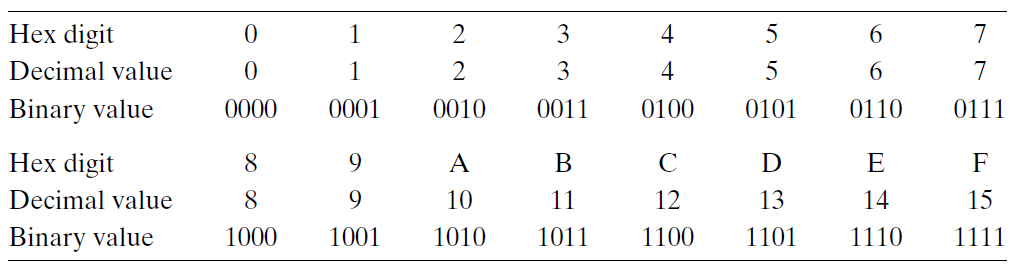
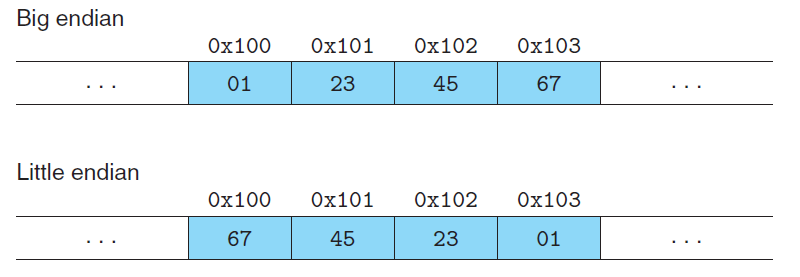
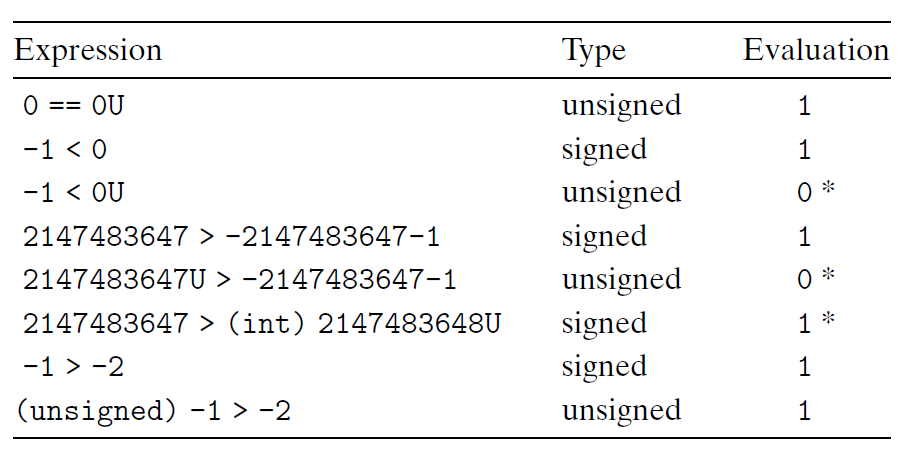
    <content type="html"><![CDATA[<center><font size ='5'><i>Computer System A Programmers Perspective</i></font></center><span id="more"></span><style>.center {  width: auto;  display: table;  margin-left: auto;  margin-right: auto;}</style>This book is written from a programmer's perspective which describes how application programmers can use their knowledge of a system to write better programs. <hr><center><font size ='4'><i>Chapter 2</i></font></center><hr><h3 id="Pre"><a href="#Pre" class="headerlink" title="Pre"></a>Pre</h3><ul><li><em>Unsigned encodings</em> are based on traditional binary notation, representing numbers greater than or equal to 0.</li><li><em>Two’s-complement encodings</em> are the most common way to represent signed integers, that is, numbers that may be either positive or negative.</li><li><em>Floating-point encodings</em> are a base-two version of scientific notation for<br>representing real numbers.</li></ul><hr><h3 id="2-1-Information-Storage"><a href="#2-1-Information-Storage" class="headerlink" title="2.1 Information Storage"></a>2.1 Information Storage</h3><h4 id="Hexadecimal-Notation"><a href="#Hexadecimal-Notation" class="headerlink" title="Hexadecimal Notation"></a>Hexadecimal Notation</h4><p>Numeric constants starting with 0x or 0X are interpreted as being in <em>hexadecimal</em>, (or simply <em>“hex”</em>).<br><img src="https://cdn.jsdelivr.net/gh/yingxiaowoxx/Blog-img/img/20221115202427.png" alt="Hexadecimal notation"></p><h4 id="Words"><a href="#Words" class="headerlink" title="Words"></a>Words</h4><p>for a machine with a w-bit word size, the virtual addresses can range from 0 to 2w − 1, giving the program access to at most 2w bytes.</p><h4 id="Addressing-and-Byte-Ordering"><a href="#Addressing-and-Byte-Ordering" class="headerlink" title="Addressing and Byte Ordering"></a>Addressing and Byte Ordering</h4><p><em>Little endian</em>： The former convention—where the least significant byte comes first.(This convention is followed by most Intel-compatible machines.)<br><em>Big endian</em>: The latter convention—where the most significant byte comes first.<br>Supposing the variable x of type int and at address 0x100 has a hexadecimal value of 0x01234567.(This convention is followed by most machines from IBM and Sun Microsystems.)<br><img src="https://cdn.jsdelivr.net/gh/yingxiaowoxx/Blog-img/img/20221116103317.png" alt="Example"></p><p>Story:<font color='gary'>In fact, the terms “little endian” and “big endian” come from the book Gulliver’s Travels by Jonathan Swift, where two warring factions could not agree as to how a soft-boiled egg should be opened—by the little end or by the big.</font></p><h4 id="Bit-Level-Operations-in-C"><a href="#Bit-Level-Operations-in-C" class="headerlink" title="Bit-Level Operations in C"></a>Bit-Level Operations in C</h4><p>As an application of the property that a ^ a &#x3D; 0 for any bit vector a, consider the following program:</p><figure class="highlight c"><table><tr><td class="gutter"><pre><span class="line">1</span><br><span class="line">2</span><br><span class="line">3</span><br><span class="line">4</span><br><span class="line">5</span><br><span class="line">6</span><br><span class="line">7</span><br><span class="line">8</span><br><span class="line">9</span><br><span class="line">10</span><br><span class="line">11</span><br><span class="line">12</span><br><span class="line">13</span><br><span class="line">14</span><br><span class="line">15</span><br><span class="line">16</span><br><span class="line">17</span><br></pre></td><td class="code"><pre><code class="hljs c"><span class="hljs-type">void</span> <span class="hljs-title function_">inplace_swap</span><span class="hljs-params">(<span class="hljs-type">int</span> *x, <span class="hljs-type">int</span> *y)</span>&#123;                                   <br>    *y = *x ^ *y;<br>    *x = *x ^ *y;<br>    *y = *x ^ *y;<br>&#125;<br><br><span class="hljs-type">void</span> <span class="hljs-title function_">reverse_array</span><span class="hljs-params">(<span class="hljs-type">int</span> a[], <span class="hljs-type">int</span> length)</span><br>&#123;<br>    <span class="hljs-type">int</span> first, last;<br>    <br>    <span class="hljs-keyword">for</span> (first = <span class="hljs-number">0</span>, last = length<span class="hljs-number">-1</span>; first&lt;last; first++, last--)<br>        inplace_swap(&amp;a[first], &amp;a[last]);<br>    <br>    <span class="hljs-keyword">for</span> (first=<span class="hljs-number">0</span>; first&lt;length; first++)<br>        <span class="hljs-built_in">printf</span>(<span class="hljs-string">&quot;%d&quot;</span>, a[first]);<br>    <span class="hljs-built_in">printf</span>(<span class="hljs-string">&quot;\n&quot;</span>);<br>&#125;<br></code></pre></td></tr></table></figure><div class="center"><table><thead><tr><th align="center">Steps</th><th align="center">x</th><th align="center">y</th></tr></thead><tbody><tr><td align="center">initialization</td><td align="center">0100 0001</td><td align="center">0101 1001</td></tr><tr><td align="center">Steps 1</td><td align="center">0100 0001</td><td align="center">0001 1000</td></tr><tr><td align="center">Steps 2</td><td align="center">0101 1001</td><td align="center">0001 1000</td></tr><tr><td align="center">Steps 3</td><td align="center">0101 1001</td><td align="center">0100 0001</td></tr></tbody></table></div><hr><h3 id="2-2-Integer-Representations"><a href="#2-2-Integer-Representations" class="headerlink" title="2.2 Integer Representations"></a>2.2 Integer Representations</h3><h4 id="Unsigned-Encodings"><a href="#Unsigned-Encodings" class="headerlink" title="Unsigned Encodings"></a>Unsigned Encodings</h4><p>$B2U_{w}$(for “binary to unsigned,” length w):</p><p>$B2U_{w}(\vec{x})\doteq\sum_{i&#x3D;0}^{w-1}x_{i}2^i$</p><h4 id="Two’s-Complement-Encodings"><a href="#Two’s-Complement-Encodings" class="headerlink" title="Two’s-Complement Encodings"></a>Two’s-Complement Encodings</h4><p>$B2T_{w}$ (for “binary to two’s-complement” length w):</p><p>$B2T_{w}(\vec{x})\doteq-x_{w-1}2^{w-1}+\sum_{i&#x3D;0}^{w-2}x_{i}2^i$</p><h4 id="Signed-vs-Unsigned-in-C"><a href="#Signed-vs-Unsigned-in-C" class="headerlink" title="Signed vs. Unsigned in C"></a>Signed vs. Unsigned in C</h4><p>Although the C standard does not specify a particular representation of signed numbers, almost all machines use <strong>two’s complement</strong>. Generally, <strong>most numbers are signed by default</strong>. For example, when declaring a constant such as 12345 or 0x1A2B, the value is considered signed. <strong>Adding character ‘U’ or ‘u’</strong> as a suffix creates an unsigned constant, e.g., 12345U or 0x1A2Bu.</p><p>When an operation is performed where one operand is <strong>signed</strong> and the other is <strong>unsigned</strong>, C implicitly casts the signed argument to unsigned and performs the operations assuming<br>the numbers are <strong>nonnegative</strong>.<br><img src="https://cdn.jsdelivr.net/gh/yingxiaowoxx/Blog-img/img/20221118163942.png" alt="Effects of C promotion rules."></p><h4 id="Expanding-the-Bit-Representation-of-a-Number"><a href="#Expanding-the-Bit-Representation-of-a-Number" class="headerlink" title="Expanding the Bit Representation of a Number"></a>Expanding the Bit Representation of a Number</h4><p>To convert an <strong>unsigned number</strong> to a larger data type, we can simply add leading zeros to the representation; this operation is known as <em>zero extension</em>$[x_{w-1},x_{w-2},\cdots,x_{0}]$. For converting a <strong>two’scomplement number</strong> to a larger data type, the rule is to perform a <em>sign extension</em>, adding copies of the most significant bit to the representation $[x_{w-1},\cdots,x_{w-1},x_{w-1},x_{w-2},\cdots,x_{0}]$.</p><p>As an example, consider the following code:</p><figure class="highlight c"><table><tr><td class="gutter"><pre><span class="line">1</span><br><span class="line">2</span><br><span class="line">3</span><br><span class="line">4</span><br><span class="line">5</span><br><span class="line">6</span><br><span class="line">7</span><br><span class="line">8</span><br><span class="line">9</span><br><span class="line">10</span><br><span class="line">11</span><br><span class="line">12</span><br><span class="line">13</span><br></pre></td><td class="code"><pre><code class="hljs C"><span class="hljs-type">short</span> sx = <span class="hljs-number">-12345</span>; <span class="hljs-comment">/* -12345 */</span><br><span class="hljs-type">unsigned</span> <span class="hljs-type">short</span> usx = sx; <span class="hljs-comment">/* 53191 */</span><br><span class="hljs-type">int</span> x = sx; <span class="hljs-comment">/* -12345 */</span><br><span class="hljs-type">unsigned</span> ux = usx; <span class="hljs-comment">/* 53191 */</span><br><br><span class="hljs-built_in">printf</span>(<span class="hljs-string">&quot;sx = %d:\t&quot;</span>, sx);<br>show_bytes((byte_pointer) &amp;sx, <span class="hljs-keyword">sizeof</span>(<span class="hljs-type">short</span>));<br><span class="hljs-built_in">printf</span>(<span class="hljs-string">&quot;usx = %u:\t&quot;</span>, usx);<br>show_bytes((byte_pointer) &amp;usx, <span class="hljs-keyword">sizeof</span>(<span class="hljs-type">unsigned</span> <span class="hljs-type">short</span>));<br><span class="hljs-built_in">printf</span>(<span class="hljs-string">&quot;x = %d:\t&quot;</span>, x);<br>show_bytes((byte_pointer) &amp;x, <span class="hljs-keyword">sizeof</span>(<span class="hljs-type">int</span>));<br><span class="hljs-built_in">printf</span>(<span class="hljs-string">&quot;ux = %u:\t&quot;</span>, ux);<br>show_bytes((byte_pointer) &amp;ux, <span class="hljs-keyword">sizeof</span>(<span class="hljs-type">unsigned</span>));<br></code></pre></td></tr></table></figure><figure class="highlight c"><table><tr><td class="gutter"><pre><span class="line">1</span><br><span class="line">2</span><br><span class="line">3</span><br><span class="line">4</span><br><span class="line">5</span><br></pre></td><td class="code"><pre><code class="hljs C"><span class="hljs-comment">//output</span><br>sx = <span class="hljs-number">-12345</span>: cf c7<br>usx = <span class="hljs-number">53191</span>: cf c7<br>x = <span class="hljs-number">-12345</span>: ff ff cf c7<br>ux = <span class="hljs-number">53191</span>: <span class="hljs-number">00</span> <span class="hljs-number">00</span> cf c7<br></code></pre></td></tr></table></figure><hr><h3 id="2-3-Integer-Arithmetic"><a href="#2-3-Integer-Arithmetic" class="headerlink" title="2.3 Integer Arithmetic"></a>2.3 Integer Arithmetic</h3><h4 id="Abelian-Group"><a href="#Abelian-Group" class="headerlink" title="Abelian Group:"></a>Abelian Group:</h4><p>A mathematical structure of <strong>Modular Addition</strong>.<br>$$-_{w}^ux &#x3D; \begin{cases}<br>x,&amp; x&#x3D;0 \\<br>2^w-x,&amp; x&gt;0 \\<br>\end{cases}$$</p><p><i><font color="gray">To be continued…</font></i></p>]]></content>
    
    
    <summary type="html">&lt;center&gt;
&lt;font size =&#39;5&#39;&gt;&lt;i&gt;Computer System A Programmers Perspective&lt;/i&gt;&lt;/font&gt;
&lt;/center&gt;</summary>


    <category term="Computer Science" scheme="https://nocticat.com/categories/Computer-Science/"/>
    
    
    <category term="Computer Scinece" scheme="https://nocticat.com/tags/Computer-Scinece/"/>
    
    <category term="Programming" scheme="https://nocticat.com/tags/Programming/"/>
    
  </entry>
  
  <entry>
    <title>CSapp-Chapter1</title>
    <link href="https://nocticat.com/Computer-Science/CSapp-Chapter-1/"/>
    <id>https://nocticat.com/Computer-Science/CSapp-Chapter-1/</id>
    <published>2022-11-12T06:16:15.000Z</published>
    <updated>2023-03-20T12:22:07.000Z</updated>
    
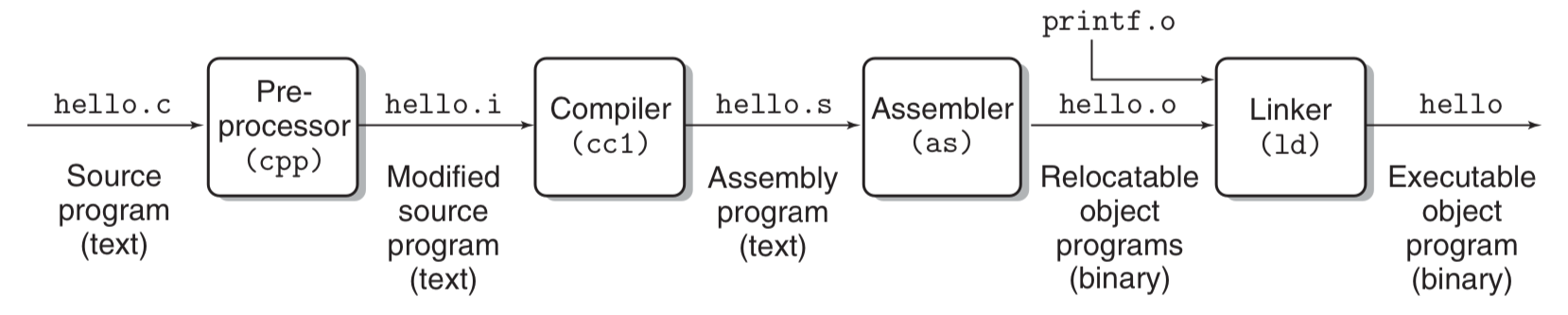
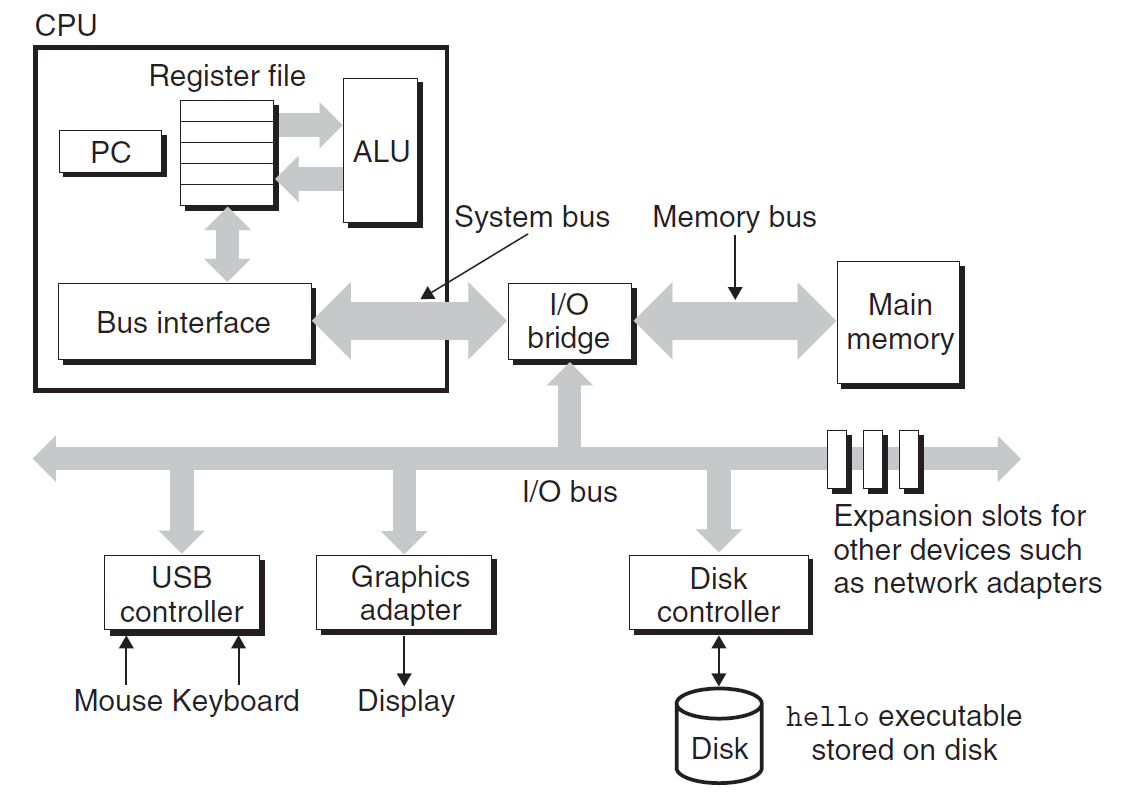
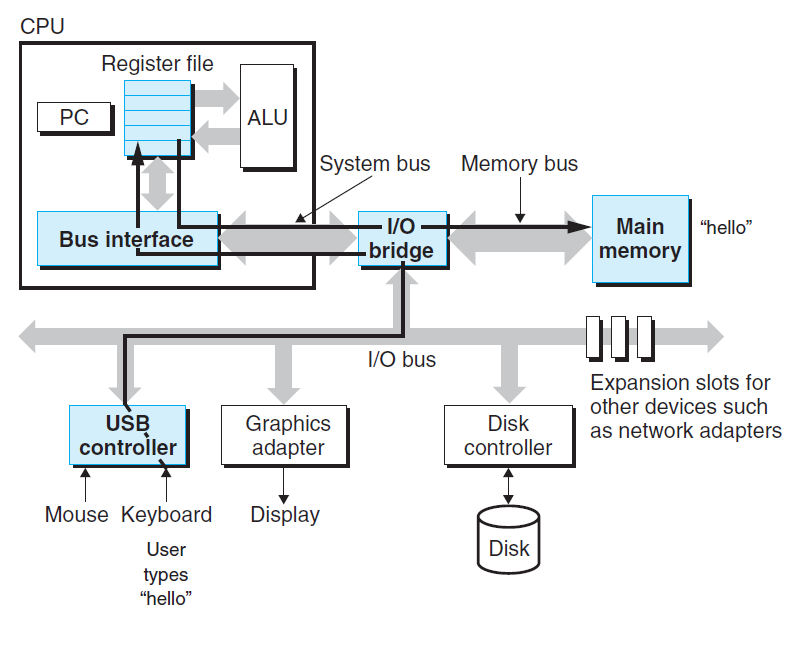
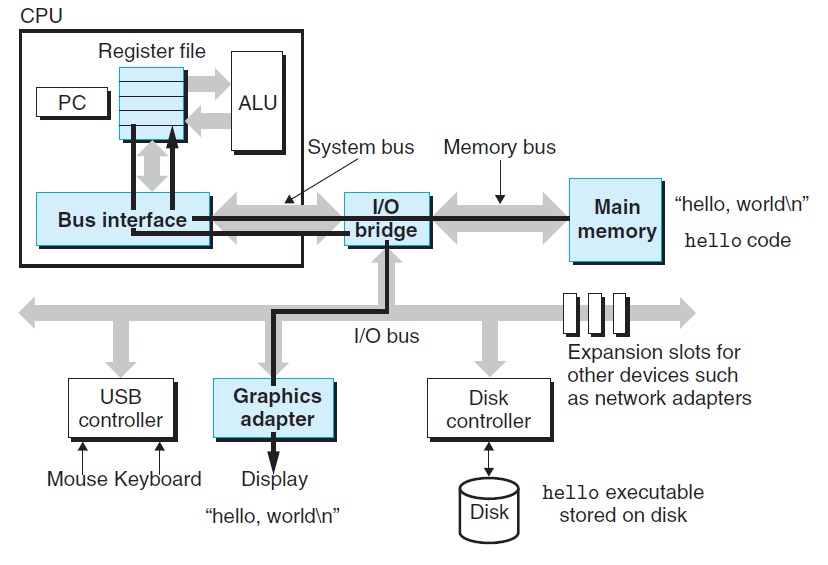
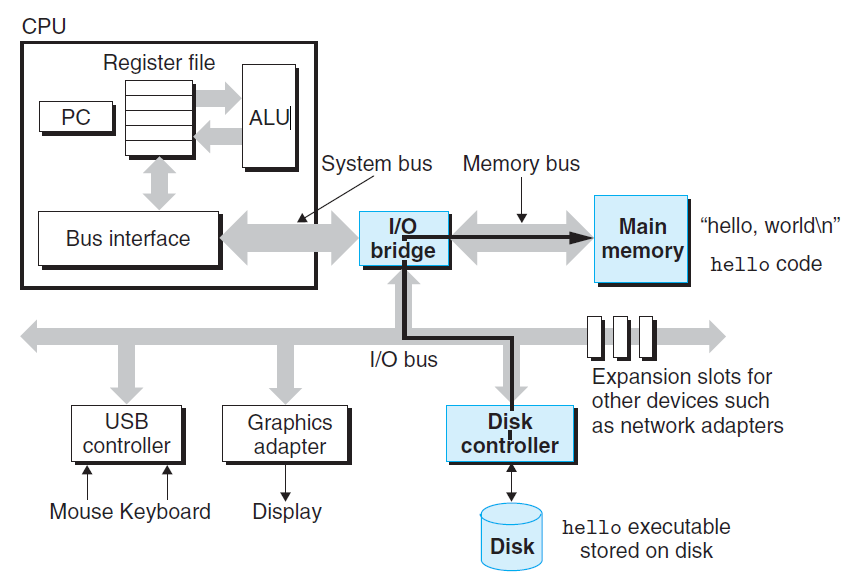
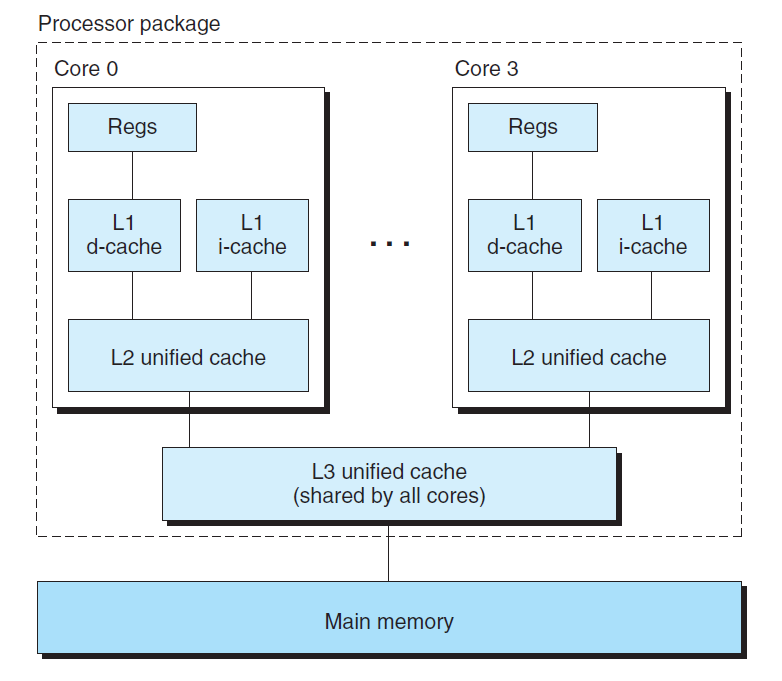
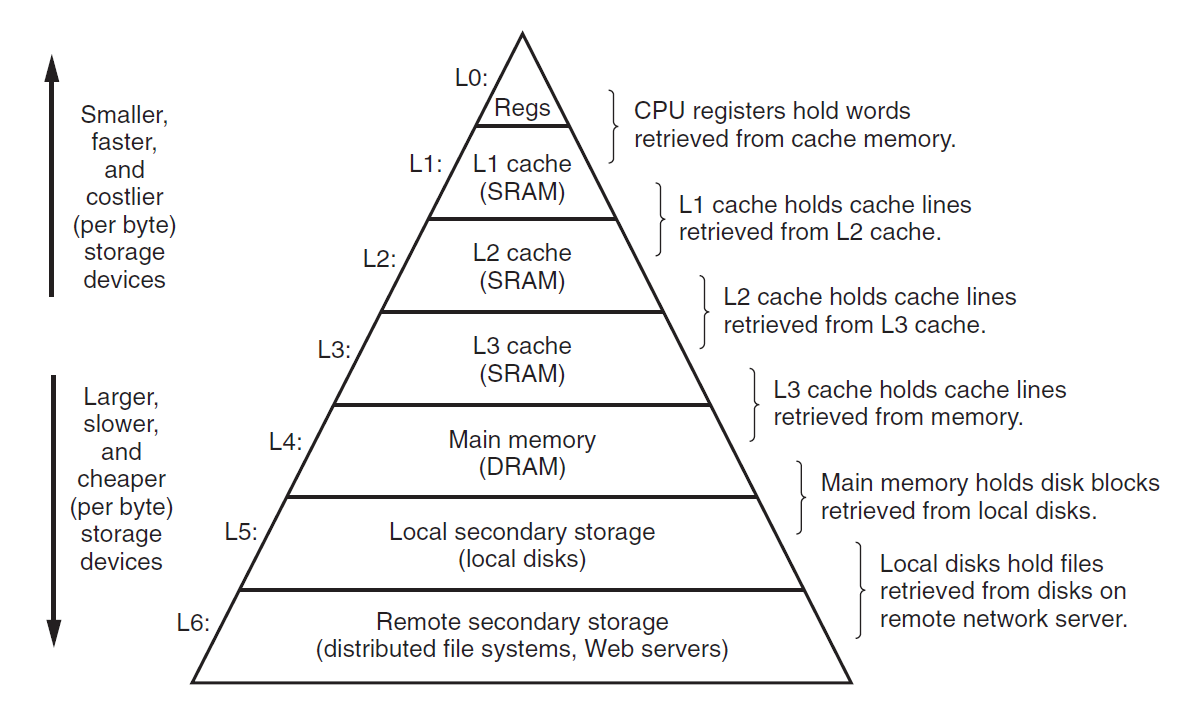
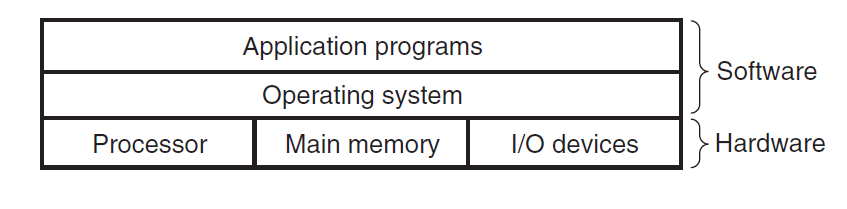
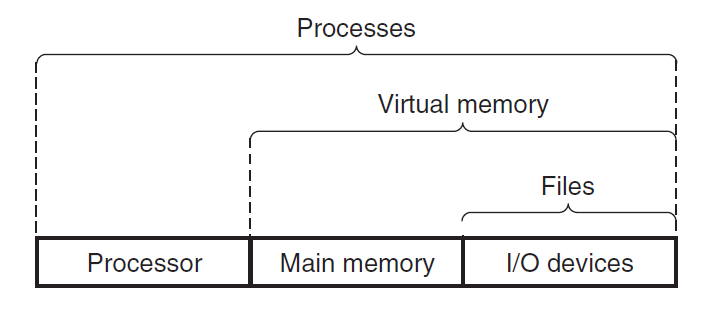
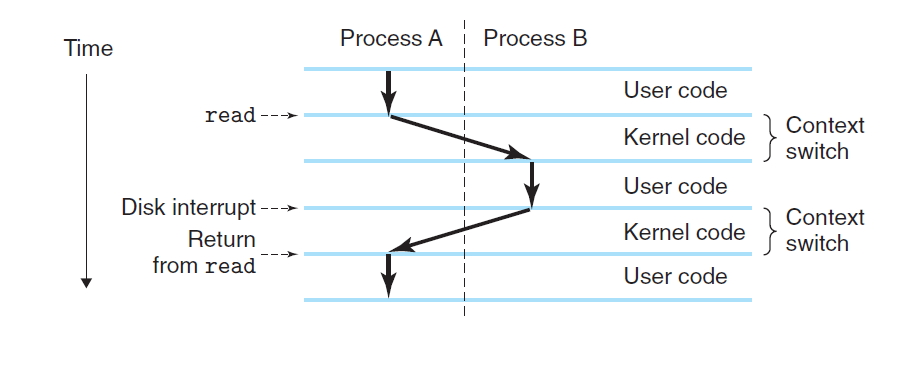
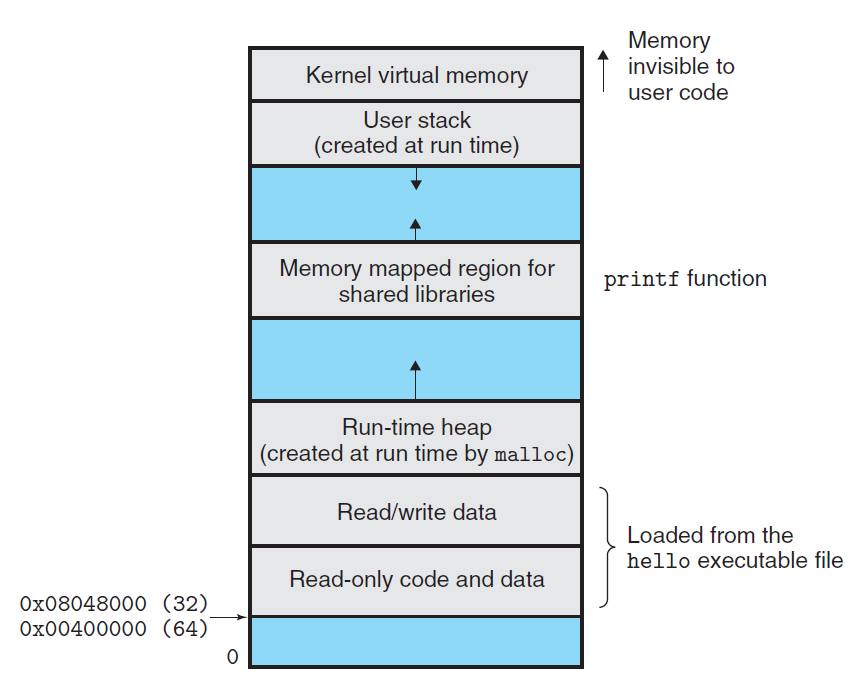
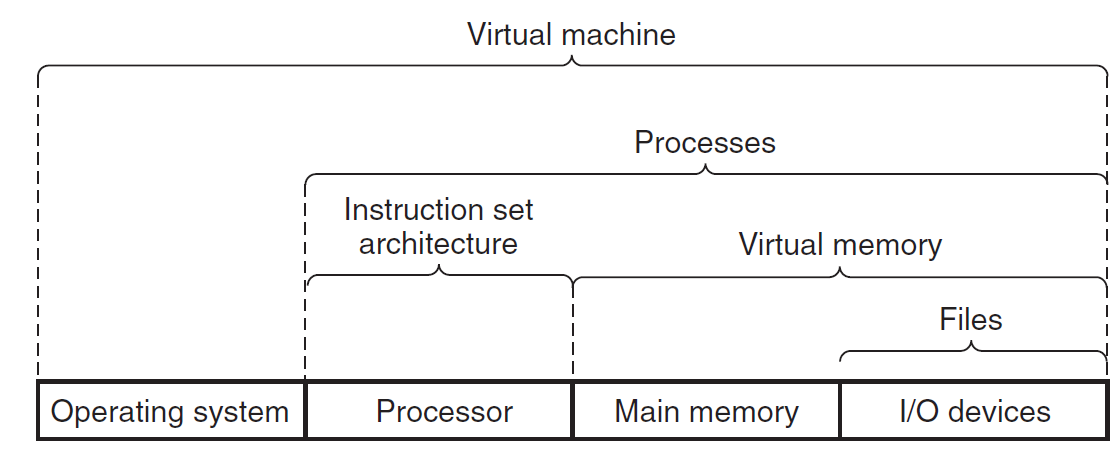
    <content type="html"><![CDATA[<center><font size ='5'><i>Computer System A Programmers Perspective</i></font></center><span id="more"></span>This book is written from a programmer's perspective which describes how application programmers can use their knowledge of a system to write better programs. <hr><center><font size ='4'><i>Chapter 1</i></font></center><hr><h3 id="1-1-Lifetime-of-hello-c"><a href="#1-1-Lifetime-of-hello-c" class="headerlink" title="1.1 Lifetime of hello.c:"></a>1.1 Lifetime of hello.c:</h3><p>This book begins its study of systems by tracing the lifetime of the hello program, from the time it is created by a programmer, until it runs on a system, prints its simple message, and terminates.</p><p> <em>hello.c</em> :</p><figure class="highlight c"><table><tr><td class="gutter"><pre><span class="line">1</span><br><span class="line">2</span><br><span class="line">3</span><br><span class="line">4</span><br><span class="line">5</span><br><span class="line">6</span><br></pre></td><td class="code"><pre><code class="hljs C"><span class="hljs-meta">#<span class="hljs-keyword">include</span><span class="hljs-string">&lt;stdio.h&gt;</span></span><br><br><span class="hljs-type">int</span> <span class="hljs-title function_">main</span><span class="hljs-params">()</span>&#123;<br>    <span class="hljs-built_in">printf</span>(<span class="hljs-string">&#x27;Hello world!&#x27;</span>);<br>    <span class="hljs-keyword">return</span> <span class="hljs-number">0</span>;<br>&#125;<br></code></pre></td></tr></table></figure><p>Lifetime of hello.c:<br><img src="https://cdn.jsdelivr.net/gh/yingxiaowoxx/Blog-img/img/lifetime_of_hello.png" alt="lifetime_of_hello"></p><hr><h3 id="1-2-Hardware"><a href="#1-2-Hardware" class="headerlink" title="1.2 Hardware"></a>1.2 Hardware</h3><p>Hardware organization of a typical system:<br><img src="https://cdn.jsdelivr.net/gh/yingxiaowoxx/Blog-img/img/Hardware_organization.png" alt="Hardware_organization"></p><ul><li><p><em>Buses</em>: a collection of electrical conduits running through the system.</p></li><li><p><em>Main Memory</em>: <u>a temporary storage device</u> consisting of a collection of <em>dynamic random access memory(DRAM)</em> chips. </p></li><li><p><em>Processor</em>: <em>Centural Processing Unit(CPU)</em>, is the engine that interprets (or executes) instructions stored in main memory. At its core is a word-sized storage device (or register) called the <em>program counter (PC)</em>.</p></li></ul><hr><h3 id="1-3-Runing-the-hello-programme"><a href="#1-3-Runing-the-hello-programme" class="headerlink" title="1.3 Runing the hello programme"></a>1.3 Runing the <em>hello</em> programme</h3><p><img src="https://cdn.jsdelivr.net/gh/yingxiaowoxx/Blog-img/img/Reading.png" alt="Reading"><br><img src="https://cdn.jsdelivr.net/gh/yingxiaowoxx/Blog-img/img/Writing.png" alt="Writing"><br><img src="https://cdn.jsdelivr.net/gh/yingxiaowoxx/Blog-img/img/Loading.png" alt="Loading"></p><ul><li><p><em>Cache</em>: Because the processor can<br>read data from the register file almost <strong>100 times faster</strong> than from memory. To deal with the processor-memory gap, system designers include smaller faster storage devices called <em>cache memories</em>.</p><ul><li><em>L1 Cache</em> : holding tens of thousands of bytes and can be accessed nearly as fast as the <strong>register file</strong>, using <em>static random access memory (SRAM)</em>.</li><li><em>L2 cache</em> : hundreds of thousands to millions of bytes is connected to the <strong>processor</strong> by a special bus, using <em>static random access memory (SRAM)</em>.</li><li><em>L3 cache</em> : It is specialized memory developed to <strong>improve the performance of L1 and L2</strong>. L1 or L2 can be significantly faster than L3, though L3 is usually double the speed of DRAM.</li></ul></li></ul><p><img src="https://cdn.jsdelivr.net/gh/yingxiaowoxx/Blog-img/img/CPU_Organization.png" alt="CPU_Organization"></p><hr><h3 id="1-4-Storage-Devices-Form-a-Hierarchy"><a href="#1-4-Storage-Devices-Form-a-Hierarchy" class="headerlink" title="1.4 Storage Devices Form a Hierarchy"></a>1.4 Storage Devices Form a Hierarchy</h3><p>The main idea of a memory hierarchy is that storage at one level serves as a<br>cache for storage at the next lower level.<br><img src="https://cdn.jsdelivr.net/gh/yingxiaowoxx/Blog-img/img/An_example_o_a_memory_hierarchy..png" alt="An_example_o_a_memory_hierarchy."></p><hr><h3 id="1-5-The-Operating-System-Manages-the-Hardware"><a href="#1-5-The-Operating-System-Manages-the-Hardware" class="headerlink" title="1.5 The Operating System Manages the Hardware"></a>1.5 The Operating System Manages the Hardware</h3><p><strong>Operating System</strong> works as a bridge between application programs <font color="gray">(hello program)</font>. and hardware <font color="gray">(keyboard, display, disk, or main memory)</font>.<br><img src="https://cdn.jsdelivr.net/gh/yingxiaowoxx/Blog-img/img/Operating_System.png" alt="Operating_System"><br>The operating system has two primary purposes: </p><ol><li>To <strong>protect the hardware</strong> from misuse by runaway applications. </li><li>To provide <strong>applications with simple and uniform mechanisms</strong> for manipulating complicated and often wildly different low-level hardware devices.</li></ol><p>The operating system achieves both goals via the fundamental abstractions shown bellow: <em>processes, virtual memory, and<br>files</em>.<br><img src="https://cdn.jsdelivr.net/gh/yingxiaowoxx/Blog-img/img/Abstractions.png" alt="Abstractions"></p><ul><li><p><em>Process</em>: A <em>process</em> is <strong>the operating system’s abstraction for a running program</strong>. Multiple processes can run concurrently on the same system, and each process appears to have exclusive use of the hardware. At any point in time, a uniprocessor system can only execute the code for a single process.When the operating system decides to transfer control from the current process to some new process, it performs a <em>context switch</em>.<br><img src="https://cdn.jsdelivr.net/gh/yingxiaowoxx/Blog-img/img/Process_context_switch.png" alt="Process_context_switch"></p></li><li><p><em>Threads</em> :Although we normally think of a process as having a single control flow, in modern systems a <strong>process can actually consist of multiple execution units</strong>, called <em>threads</em>, each running in the context of the process and sharing the same code and global data.</p></li><li><p><em>Virtual Memory</em>: It is an abstraction that provides each process with the illusion that it as exclusive use of the main memory. Each process has the same uniform view of memory, which is known as its <em>virtual address space</em>. The basic idea is to <strong>store</strong> the contents of a process’s virtual memory <strong>on disk</strong>, and then <strong>use</strong> the main memory as a cache <strong>for the disk</strong>.</p><ul><li><em>Program code and data</em>: Code begins at the same <strong>fixed address</strong> for all processes, followed by data locations that correspond to globalCvariables.</li><li><em>Heap</em>: It <strong>expands and contracts dynamically</strong> at run time as a result of calls to C standard library routines such as <em>malloc</em> and <em>free</em>.</li><li><em>Shared libraries</em>: Such as the <em>C standard library</em> and the <em>math library</em>.</li><li><em>Stack</em>: Where the compiler uses to implement function calls.Like the heap, it expands and contracts dynamically during the execution of the program.</li><li><em>Kernel virtual memory</em>: The kernel is <strong>the part of the operating system</strong> that is always resident in memory.</li></ul></li></ul><p><img src="https://cdn.jsdelivr.net/gh/yingxiaowoxx/Blog-img/img/Process_virtual_address_space..png" alt="Process_virtual_address_space."></p><ul><li><em>File</em>: It is a sequence of bytes.</li></ul><h3 id="1-6-Concurrency-and-Parallelism"><a href="#1-6-Concurrency-and-Parallelism" class="headerlink" title="1.6 Concurrency and Parallelism"></a>1.6 Concurrency and Parallelism</h3><p><em>Concurrency</em>: It refers to <strong>the general concept</strong> of a system with <em>multiple, simultaneous activities</em>.</p><p><em>Parallelism</em>: It refers to <strong>the use of concurrency</strong> to make a system <strong>run faster</strong>.</p><p>Three levels of abstraction in a computer system:</p><ul><li><p><em>Thread-Level Concurrency</em>: The use of multiprocessing can improve system performance in two ways.</p><ul><li>First, it reduces the need to simulate concurrency when performing multiple tasks.</li><li>Second, it can run a single application program faster, but only if that program is expressed in terms of multiple threads that can effectively execute in parallel.<pre><code class=" mermaid">graph LR;     Uniprocessor System --&gt; Multiprocessor System --&gt; Multi-core Processors &amp; Hyperthreading --&gt; Simultaneous Multi-threading     style Uniprocessor System fill:#D4EFFC,stroke:#5BCAF5     style Multiprocessor System fill:#D4EFFC,stroke:#5BCAF5     style Multi-core Processors fill:#D4EFFC,stroke:#5BCAF5     style Hyperthreading fill:#D4EFFC,stroke:#5BCAF5     style Simultaneous Multi-threading fill:#D4EFFC,stroke:#5BCAF5</code></pre></li></ul></li><li><p><em>Instruction-Level Parallelism</em>: At a much lower level of abstraction, modern processors can execute multiple instructions at one time, a property known as <em>instruction-level parallelism</em>.</p></li><li><p><em>Single-Instruction, Multiple-Data (SIMD) Parallelism</em>: At the lowest level, many modern processors have special hardware that allows a single instruction to cause multiple operations to be performed in parallel, a mode known as <em>single-instruction, multiple-data, or “SIMD” parallelism</em>.</p></li></ul><h3 id="1-7-Some-abstractions-provided-by-a-computer-system"><a href="#1-7-Some-abstractions-provided-by-a-computer-system" class="headerlink" title="1.7 Some abstractions provided by a computer system:"></a>1.7 Some abstractions provided by a computer system:</h3><ol><li><em>Files</em> as an abstraction of I&#x2F;O </li><li><em>Virtual Memory</em> as an abstraction of program memory</li><li><em>Processes</em> as an abstraction of a running program.<ol><li><em>Virtual Machine</em> as an abstraction of the entire computer<br><img src="https://cdn.jsdelivr.net/gh/yingxiaowoxx/Blog-img/img/Some_abstractions_provided_by_operating_system.png" alt="Some_abstractions_provided_by_operating_system"></li></ol></li></ol><p><i><font color="gray">Thanks for reading!</font></i></p>]]></content>
    
    
    <summary type="html">&lt;center&gt;
&lt;font size =&#39;5&#39;&gt;&lt;i&gt;Computer System A Programmers Perspective&lt;/i&gt;&lt;/font&gt;
&lt;/center&gt;</summary>


    <category term="Computer Science" scheme="https://nocticat.com/categories/Computer-Science/"/>
    
    
    <category term="Computer Scinece" scheme="https://nocticat.com/tags/Computer-Scinece/"/>
    
    <category term="Programming" scheme="https://nocticat.com/tags/Programming/"/>
    
  </entry>
  
  <entry>
    <title>Probability_Theory</title>
    <link href="https://nocticat.com/Mathematics/Probability-Theory/"/>
    <id>https://nocticat.com/Mathematics/Probability-Theory/</id>
    <published>2022-11-08T02:40:10.000Z</published>
    <updated>2024-07-06T16:17:28.400Z</updated>
    
    <content type="html"><![CDATA[<center><font size ='5'><i>This blog just works as a formula stack.</i></font></center><span id="more"></span><hr><!-- more --><h2 id="Formula"><a href="#Formula" class="headerlink" title="Formula"></a>Formula</h2><h3 id="Law-of-Total-Probability"><a href="#Law-of-Total-Probability" class="headerlink" title="Law of Total Probability"></a>Law of Total Probability</h3><p><strong>IF</strong>: {${A_{i}:i&#x3D;1,2,3…,n}$} is a finite or countably infinite partition of a sample space.</p><p><strong>THEN</strong> for any event $B$:<br>$$ P(B)&#x3D;\sum*{i&#x3D;1}^n P(A*{i})P(B|A_{i}) $$</p><h3 id="Bayes’-Theorem"><a href="#Bayes’-Theorem" class="headerlink" title="Bayes’ Theorem"></a>Bayes’ Theorem</h3><p><strong>IF</strong>:{${A_{i}:i&#x3D;1,2,3,…,n}$} is a finite or countably infinite partition of a sample space (happens firstly), and $B$ is a fixed event(happens secondly).</p><p><strong>THEN</strong> for any event $A_{k}(k\in{1,2,3,…,n})$:</p><p>$$<br>P(A_{k}|B)&#x3D;\frac{P(A_{k})P(B|A_{k})}{\sum_{i&#x3D;1}^nP(A_{i})P(B|A_{i})}<br>$$</p><h3 id="Binomial-Distribution-X-sim-B-n-p"><a href="#Binomial-Distribution-X-sim-B-n-p" class="headerlink" title="Binomial Distribution $X \sim B(n, p)$"></a>Binomial Distribution $X \sim B(n, p)$</h3><p><strong>IF</strong> the random variable $X$ follows the binomial distribution with and $p ∈ [0,1]$, we write $X \sim B(n, p)$.</p><p><strong>THEN</strong>The probability of getting exactly <em>k successes in n independent Bernoulli trials</em> is given by the probability mass function :</p><p>$$<br>P\left(X&#x3D;k\right)&#x3D;C_{n}^kp^k(1-p)^k<br>$$</p><h3 id="Poisson-Distribution-X-sim-P-lambda"><a href="#Poisson-Distribution-X-sim-P-lambda" class="headerlink" title="Poisson Distribution $X \sim P(\lambda)$"></a>Poisson Distribution $X \sim P(\lambda)$</h3><p><strong>IF</strong> a discrete random variable X is said to have a Poisson distribution, with parameter $\lambda&gt;0$, we write $X \sim P(\lambda)$ or $X \sim \pi(\lambda)$.</p><p><strong>THEN</strong> it has a probability mass function given by :</p><p>$$<br>P\left(X&#x3D;k\right)&#x3D;\frac{\lambda^k}{k!}e^{-\lambda}<br>$$</p><h3 id="Continuous-Uniform-Distribution-X-sim-U-a-b"><a href="#Continuous-Uniform-Distribution-X-sim-U-a-b" class="headerlink" title="Continuous Uniform Distribution $X \sim U(a,b)$"></a>Continuous Uniform Distribution $X \sim U(a,b)$</h3><p><strong>IF</strong> the <em>probability density function</em> of the continuous uniform distribution $x$ is :</p><p>$$<br>f(x) &#x3D; \begin{cases}<br>\frac{1}{b-a},&amp; a&lt;x&lt;b\\<br>0,&amp; else \\<br>\end{cases}<br>$$</p><p><strong>THEN</strong> we write $X \sim U(a,b)$, and the <em>cumulative distribution function</em> is :</p><p>$$<br>F(x) &#x3D; \begin{cases}<br>0,&amp; x&lt;a\\<br>\frac{x-a}{b-a},&amp; a \leq x &lt; b \\<br>1,&amp; x \geq b<br>\end{cases}<br>$$</p><h3 id="Exponential-distribution-X-sim-E-lambda"><a href="#Exponential-distribution-X-sim-E-lambda" class="headerlink" title="Exponential distribution $X \sim E(\lambda)$"></a>Exponential distribution $X \sim E(\lambda)$</h3><p><strong>IF</strong> the <em>probability density function</em> of the continuous uniform distribution $x$ and the <em>rate parameter</em> $\lambda &gt; 0$ is :</p><p>$$<br>f(x;\lambda) &#x3D; \begin{cases}<br>\lambda e^{-\lambda x},&amp; x\geq 0 \\<br>0,&amp; x&lt;0 \\<br>\end{cases}<br>$$</p><p><strong>THEN</strong> we write $X \sim E(\lambda)$, and the <em>cumulative distribution function</em> is given by :</p><p>$$<br>F(x)&#x3D;\begin{cases}<br>1-e^{-\lambda x},&amp;x \geq 0\\<br>0,&amp;x&lt;0\\<br>\end{cases}<br>$$</p><h3 id="Normal-Distribution-X-sim-N-mu-sigma-2"><a href="#Normal-Distribution-X-sim-N-mu-sigma-2" class="headerlink" title="Normal Distribution $X \sim N(\mu,\sigma^2)$"></a>Normal Distribution $X \sim N(\mu,\sigma^2)$</h3><p><em>Normal distribution</em>, also called <em>Gaussian distribution</em>.</p><p><strong>IF</strong> there is <em>a real-valued random variable X</em>, and the general form of its <em>probability density function</em> is:</p><p>$$<br>f(x)&#x3D;\frac{1}{\sqrt{2\pi}\sigma}e^{-\frac{(x-\mu)^2}{2\sigma^2}}<br>$$</p><p><strong>THEN</strong> We write $X \sim N(\mu,\sigma^2)$. The parameter $\mu$ is the <em>mean or expectation</em> of the distribution (and also its median and mode), while the parameter $\sigma$ is its <em>standard deviation</em>. The <em>variance</em> of the distribution is $\sigma^2$.</p><h3 id="Standard-Normal-Distribution-X-sim-N-0-1"><a href="#Standard-Normal-Distribution-X-sim-N-0-1" class="headerlink" title="Standard Normal Distribution $X \sim N(0,1)$"></a>Standard Normal Distribution $X \sim N(0,1)$</h3><p><strong>IF</strong> $X \sim N(\mu,\sigma^2)$.</p><p><strong>THEN</strong> when $\mu&#x3D;0,\sigma&#x3D;1$, we write $X \sim N(0,1)$. It is described by this <em>probability density function</em>:</p><p>$$<br>\varphi(x) &#x3D; \frac{1}{\sqrt{2\pi}}e^{-\frac{x^2}{2}}<br>$$</p><p>and the <em>cumulative distribution function</em> is given by :</p><p>$$<br>\phi(x) &#x3D; \frac{1}{\sqrt{2\pi}}\int_{-\infty}^x e^{-\frac{t^2}{2}} dt<br>$$</p><p><i><font color="gray">To Be Continued…</font></i></p>]]></content>
    
    
    <summary type="html">&lt;center&gt;
&lt;font size =&#39;5&#39;&gt;&lt;i&gt;This blog just works as a formula stack.&lt;/i&gt;&lt;/font&gt;
&lt;/center&gt;</summary>


    <category term="Mathematics" scheme="https://nocticat.com/categories/Mathematics/"/>
    
    
    <category term="Math" scheme="https://nocticat.com/tags/Math/"/>
    
    <category term="Probability Theory" scheme="https://nocticat.com/tags/Probability-Theory/"/>
    
  </entry>
  
  <entry>
    <title>Hello_world</title>
    <link href="https://nocticat.com/Hello-world/Hello_world/"/>
    <id>https://nocticat.com/Hello-world/Hello_world/</id>
    <published>2022-11-03T15:00:36.000Z</published>
    <updated>2023-03-20T12:22:09.000Z</updated>
    
    <content type="html"><![CDATA[<h3 id="Hello！"><a href="#Hello！" class="headerlink" title="Hello！"></a>Hello！</h3><p>这是一次建立博客的尝试，本博客采用<a href="https://hexo.io/" title="hexo">hexo</a>博客框架,并且部署于<a href="https://github.com/" title="Github">Github</a>的服务器中，本博客仅作为本人的笔记站及交流学习使用，未经许可，不得转载。</p><span id="more"></span><hr><h3 id="Notes"><a href="#Notes" class="headerlink" title="Notes"></a>Notes</h3><p>在日常的使用过程之中，使用<code>$ hexo new post &quot;post_name&quot; </code>新建一页博客，通过编辑之后，使用<code>$ hexo s</code>进行本地查看和管理。</p><p>在本地的调试完成之后，通过<code>$ hexo g</code>生成静态文件至public文件夹，使用<code>$ hexo d</code>将生成的静态文件push到对应的<a href="%22https://github.com/yingxiaowoxx/yingxiaowoxx.github.io%22" title="yingxiaowoxx.github.io">Github</a>仓库中，最后使用<code>$ hexo clean</code>清除本地缓存。</p><p>使用过程之中，<em>Markdown</em>的官方语法通过查询<a href="https://www.markdownguide.org/basic-syntax/" title="Markdown Guide">Markdown官方网站</a>实现。</p>]]></content>
    
    
    <summary type="html">&lt;h3 id=&quot;Hello！&quot;&gt;&lt;a href=&quot;#Hello！&quot; class=&quot;headerlink&quot; title=&quot;Hello！&quot;&gt;&lt;/a&gt;Hello！&lt;/h3&gt;&lt;p&gt;这是一次建立博客的尝试，本博客采用&lt;a href=&quot;https://hexo.io/&quot; title=&quot;hexo&quot;&gt;hexo&lt;/a&gt;博客框架,并且部署于&lt;a href=&quot;https://github.com/&quot; title=&quot;Github&quot;&gt;Github&lt;/a&gt;的服务器中，本博客仅作为本人的笔记站及交流学习使用，未经许可，不得转载。&lt;/p&gt;</summary>


    <category term="Hello_world" scheme="https://nocticat.com/categories/Hello-world/"/>
    
    
    <category term="Hello_world" scheme="https://nocticat.com/tags/Hello-world/"/>
    
  </entry>
  
</feed>